Course Reserves
Course Reserves allows instructors to put aside material for class use either in a physical library or a digital Reading List.
For Students: Find Your Course Materials
If your instructor has added a Library Reading List to your course, you will find access to your materials in your Brightspace course. Not sure? Check with your instructor and/or your course syllabus.
Search for Physical Course Reserves
Physical course reserves are kept behind the service desk at each of the libraries and are available to check out for two hours at a time. Search the catalog by title and author, course name/number, or instructor. Can’t find anything? It may be a required purchase. Ask your instructor.
For Instructors: Placing Course Reserves
Instructors can submit requests three ways:
- emailing reserves@purdue.edu
- filling out this form
- through a Reading List
Course Reserve purchases can only be requested by an instructor or their assistant or instructional designer. Students should direct their inquiries to their instructor.
Reach out to a liaison librarian to help locate material that is readily available online: Get Help
Purdue Indianapolis instructor? We’re here for you too! Reserves are now kept at the Student Center Library.
Further Info
Reading Lists (Leganto)
Instructors are encouraged to take advantage of our Library Reading List tool for electronic course reserves (example below). Library Reading Lists enable you to easily create, manage, and share course reading lists that engage students and foster meaningful learning, while saving you time and effort.
- Streamline access to course materials and reduce the cost to students by making use of library collections, librarians’ expertise, and library services.
- Instructors can easily build lists of resources that include all material types and leverage resources for active learning.
- Students can access all course materials in one place and from any device.
You can build a reading list by yourself or collaborate with others, such as colleagues or library staff. Library Reading Lists are directly integrated with your course site in Brightspace and make it simple for students to access all of the resources you’ve selected.
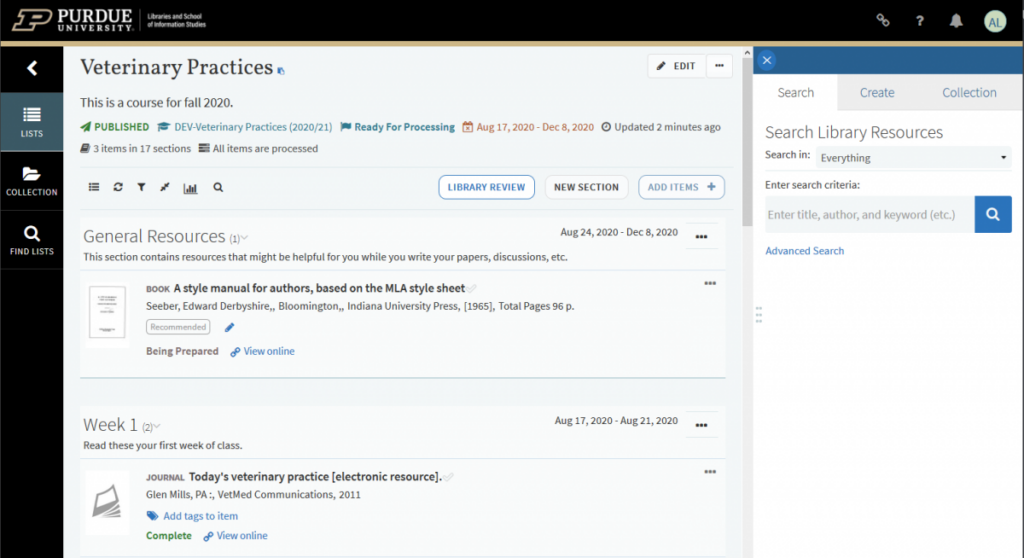
Documentation is available on our library guides platform if you are new to using and creating reading lists.
Need assistance? Feel free to email us at reserves@purdue.edu and we’ll get you started.
Copyright, Fair Use, and Accessibility
Uploading Digital Course Material
Instructors can share digital materials through Brightspace or a Reading List, but all materials on course reserves must be in compliance with the U.S. Copyright Act. For information or assistance in determining copyright status, please visit the University Copyright Office.
We can scan limited chapters from physical books we own (or your own copy) if there is not an ebook. Requirements:
- Copyright restrictions regarding Fair Use, which do not allow us to post substantial portions of a book unless it is in the public domain. We may deny your request on these grounds.
- Scanned materials must be made ADA accessible, which can be complex and labor intensive. We do what we can to make the material we scan accessible, but for some types of material (equations, diagrams, tabular data, non-English languages) we may not have the knowledge necessary to make them accessible and it is ultimately the instructor’s responsibility.
- Please submit requests as early as possible and tell us the week or date you plan to assign the reading. This lets us prioritize requests and finish them as needed.
If your course uses a lot of excerpts and articles, it is a prime candidate for using a Reading List to organize and provide access to your materials.
Instructor Responsibilities
- Materials submitted to reserves must support the course curriculum.
- Instructors will provide materials to the Libraries that have been legally obtained and are in compliance with the U.S. Copyright Act.
- Only the amount of the work needed to meet the educational purpose should be provided and posted. Entire copies of books and textbooks are not allowed unless permission has been obtained from the copyright holder.
- Use of the materials will be restricted to those students officially enrolled in the course.
- Clips of videos will be allowed to be posted but authorization must be obtained from the copyright holder for full length videos.
- In order for personal items to be placed on library course reserve, items must be original and legally obtained. Items that cannot be used for course reserve include: items labeled as Instructor’s Edition, Desk Copy, Examination Edition, Publisher’s Review Copy, or variations of those terms; physical items obtained via Interlibrary Loan; photocopies of materials, course packs, and workbooks.
Libraries Responsibilities
- Libraries will not scan articles or books that have electronic full text access through Purdue Libraries. We will link to those materials in the Library Reading List.
- Final determination of whether or not the materials are eligible for reserves is the Libraries. The Libraries also reserve the right to remove any materials for legal or administrative reasons.
- Materials will remain on reserves for no longer than the length of the course.
Student Responsibilities
Course reserve materials may not be duplicated or distributed in any format. They are solely for personal use for the designated course and may not be shared beyond that course.
Physical Reserves
You must request physical reserves every semester you want them available. At the end of each semester reserves are transferred to the general collection for student checkout.
It is best to submit requests before the semester begins so that we can pull them before students check them out.
For new purchases, if an ebook is available, we will default to it over physical copies.
Personal Copies
In order for personal items to be placed on library course reserve, items must be original and legally obtained.
Items that cannot be used for course reserve include: items labeled as Instructor’s Edition, Desk Copy, Examination Edition, Publisher’s Review Copy, or variations of those terms; physical items obtained via Interlibrary Loan; photocopies of materials, course packs, and workbooks.
Videos and DVDs
In the past, we often kept DVDs on course reserve, but we now recommend strongly against this. Most modern computers no longer have a disc drive, and most students do not own a DVD player. HSSE library does have a few stations for playing DVDs, but this is not practical for a full class.
Instead, it is far better to find an online streaming option and link to it within Brightspace or Leganto. You can search for feature films at JustWatch.com to see if they are available to stream free: many new services are offering free, ad-supported streaming of mainstream films.
If it is not available anywhere publicly, we do subscribe to some video services through libraries, and we may be able to arrange access rights through other means. Feel free to email us and we will see what we can get.
Instructors can upload short videos to Brightspace or Leganto, but they are subject to copyright the same as texts.
Deadlines
Fall 2026
For August 24, 2026 Classes
Requests due by August 3rd.
**Please note that these deadlines include submitting requests for purchase**
Any requests received after the deadlines will be processed, but cannot be guaranteed ready before classes begin.
Submitting Requests
Create your own reading list and submit requests.
Submit requests online Fill out the online form to submit your course reserve requests.
Email your list to us and we’ll help you. Please include semester, course, instructor name, and any purchase requests you may have.